1. SSH 설정
[root@localhost ~]# vi /etc/ssh/sshd_config아래 내용 중
#Port 22 -> 주석 해제
#       $OpenBSD: sshd_config,v 1.100 2016/08/15 12:32:04 naddy Exp $

# This is the sshd server system-wide configuration file.  See
# sshd_config(5) for more information.

# This sshd was compiled with PATH=/usr/local/bin:/usr/bin

# The strategy used for options in the default sshd_config shipped with
# OpenSSH is to specify options with their default value where
# possible, but leave them commented.  Uncommented options override the
# default value.

# If you want to change the port on a SELinux system, you have to tell
# SELinux about this change.
# semanage port -a -t ssh_port_t -p tcp #PORTNUMBER
#
Port 22
#AddressFamily any
#ListenAddress 0.0.0.0
#ListenAddress ::

HostKey /etc/ssh/ssh_host_rsa_key
#HostKey /etc/ssh/ssh_host_dsa_key
HostKey /etc/ssh/ssh_host_ecdsa_key
HostKey /etc/ssh/ssh_host_ed25519_key

# Ciphers and keying
#RekeyLimit default none

# Logging
#SyslogFacility AUTH
SyslogFacility AUTHPRIV
#LogLevel INFO

# Authentication:

#LoginGraceTime 2m
#PermitRootLogin yes
#StrictModes yes
2. SSH 방화벽 해제
[root@localhost ~]# firewall-cmd --zone=public --add-port=22/tcp --permanent
3. SSH 실행
[root@localhost ~]# service sshd start
Redirecting to /bin/systemctl start sshd.service
[root@localhost ~]# service sshd status
Redirecting to /bin/systemctl status sshd.service
● sshd.service - OpenSSH server daemon
   Loaded: loaded (/usr/lib/systemd/system/sshd.service; enabled; vendor preset: enabled)
   Active: active (running) since Wed 2022-03-30 21:23:10 EDT; 2h 11min ago
     Docs: man:sshd(8)
           man:sshd_config(5)
 Main PID: 1044 (sshd)
   CGroup: /system.slice/sshd.service
           └─1044 /usr/sbin/sshd -D

Mar 30 21:23:09 localhost.localdomain systemd[1]: Starting OpenSSH server daemon...
Mar 30 21:23:10 localhost.localdomain sshd[1044]: Server listening on 0.0.0.0 port 22.
Mar 30 21:23:10 localhost.localdomain sshd[1044]: Server listening on :: port 22.
Mar 30 21:23:10 localhost.localdomain systemd[1]: Started OpenSSH server daemon.
Mar 30 21:24:27 localhost.localdomain sshd[1345]: pam_unix(sshd:auth): authentication failure; logname= ...r=sj
Mar 30 21:24:28 localhost.localdomain sshd[1345]: Failed password for sj from 192.168.0.1 port 64782 ssh2
Mar 30 21:24:33 localhost.localdomain sshd[1345]: Accepted password for sj from 192.168.0.1 port 64782 ssh2
Mar 30 21:25:02 localhost.localdomain sshd[1371]: Accepted password for sj from 192.168.0.1 port 64786 ssh2
Mar 30 21:39:41 localhost.localdomain sshd[1425]: Accepted password for root from 192.168.0.1 port 65029 ssh2
Hint: Some lines were ellipsized, use -l to show in full.
4. 외부 접속 확인
- Windows 10 - Putty 사용
IP, Port 설정 후 Open
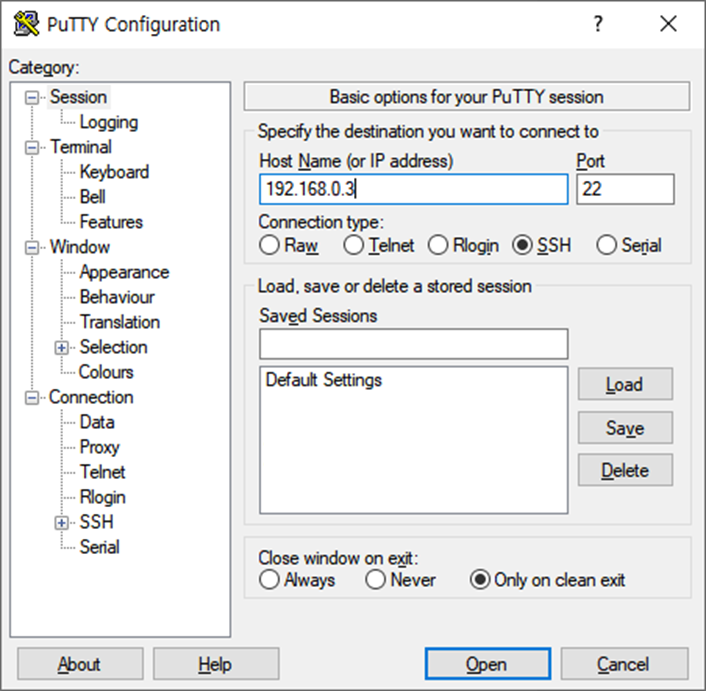
계정 / 패스워드 입력

'Server > 환경 구축 - Centos' 카테고리의 다른 글
| [Linux] CentOS 7 MySQL 계정 권한 설정 (0) | 2022.04.25 |
|---|---|
| [Linux] CentOS 7 MySQL 계정 추가 및 외부 접속 허용 (0) | 2022.04.18 |
| [Linux] CentOS 7 MySQL 설치 및 설정 (0) | 2022.04.15 |
| [Linux] CentOS 7 FTP 설정 (0) | 2022.04.01 |
| [Linux] CentOS 7 환경 구축 (0) | 2022.03.31 |