1. 파일 속성 및 권한 확인
[root@localhost home]# ls -l
total 0
-rw-r--r--. 1 root root  0 Apr 27 00:10 file_test
drwxr-xr-x. 2 root root  6 Apr 27 01:53 folder_test
| 권한 | drwxr-xr-x |
| 링크 카운터 | 2 |
| 소유자 | root |
| 그룹 소유자 | root |
| 사이즈 | 6 |
| 변경 일자 | Apr 27 01:53 |
| 이름 | folder_test |
- 권한
| 문자 | 파일 | 디렉토리 |
| r | 읽기 | 내용 읽기 |
| w | 저장, 삭제 | 파일 저장 / 디렉토리 이름 변경, 삭제 |
| x | 실행 | 접근 |
- 파일 유형
| 문자 | 내용 |
| - | 일반 파일 |
| b | 블록구조 특수 파일 |
| c | 입출력 특수 파일 |
| d | 디렉토리 |
| l | sybolic link file |
| d | r | w | x | r | - | x | r | - | x |
| 파일유형 | 소유자 권한 | 그룹 소유자 권한 | 일반 사용자 권한 | ||||||
위 내용에 따라 확인해보면
1 ] -rw-r--r--. 1 root root 0 Apr 27 00:10 file_test
- 소유자 root / 읽기 쓰기 | 그룹 root / 읽기 | 일반 사용자 / 읽기 가 가능한 일반 파일 (-)
2 ] drwxr-xr-x. 2 root root 6 Apr 27 01:53 folder_test
- 소유자 root / 읽기 쓰기 접근 | 그룹 root / 읽기 접근 | 일반사용자 / 읽기 접근 이 가능한 디렉토리 (d)
2. 파일 권한 설정
| 8 진수 | 2진수 | 권한 | 내용 |
| 0 | 000 | --- | 권한 없음 |
| 1 | 001 | --x | 실행 |
| 2 | 010 | -w- | 쓰기 |
| 3 | 011 | -wx | 쓰기 / 실행 |
| 4 | 100 | r-- | 읽기 |
| 5 | 101 | r-x | 읽기 / 실행 |
| 6 | 110 | rw- | 읽기 / 쓰기 |
| 7 | 111 | rwx | 읽기 / 쓰기 / 실행 |
- chmod [권한] [파일/디렉토리]
[root@localhost home]# chmod 700 folder_test
[root@localhost home]# ls -l
total 0
-rw-r--r--. 1 root root  0 Apr 27 00:10 file_test
drwx------. 2 root root  6 Apr 27 01:53 folder_test
변경 내용
- folder_test 에 권한 700 : 소유자 읽기/쓰기/실행 , 소유자 그룹, 일반 권한 없음
다른 계정으로 접근시
[user@localhost home]$ cd folder_test/
-bash: cd: folder_test/: Permission denied
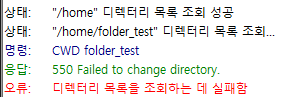
다른 계정으로 Filezilla 접근시
'Server > 기타' 카테고리의 다른 글
| [Linux] 기본 명령어 정리 (0) | 2022.04.27 |
|---|---|
| [Linux] Mysql 계정 관련 명령어 (0) | 2022.04.25 |
| [Linux] CentOS 7 FTP ( ISSUE : 550 Create directory operation failed ) (0) | 2022.04.05 |
| [ Linux ] Centos 7 timemachine / 백업 및 복구 (0) | 2022.04.05 |
| [Linux] CentOS 7 FTP ( ISSUE : 500 OOPS vsftpd: refusing to run with writable root inside chroot() ) (0) | 2022.04.04 |